
不保證時效性,為確保時效性請閱讀原始碼。
參考資料
Beehive
Beehive是KubeEdge中的核心訊息通訊框架,用於不同模組的註冊和模組之間的通訊,KubeEdge中的CloudCore和EdgeCore元件都依賴於beehive框架。因此,我們需要首先了解Beehive的工作機制,才能更進一步理解KubeEdge的設計理念和工作原理。
Beehive是基於goland channel實現的訊息通訊框架,核心能力包含兩部分:module註冊管理和module間通訊管理,分別對應beehive中定義的介面ModuleContext和MessageContext,其架構圖如下所示:
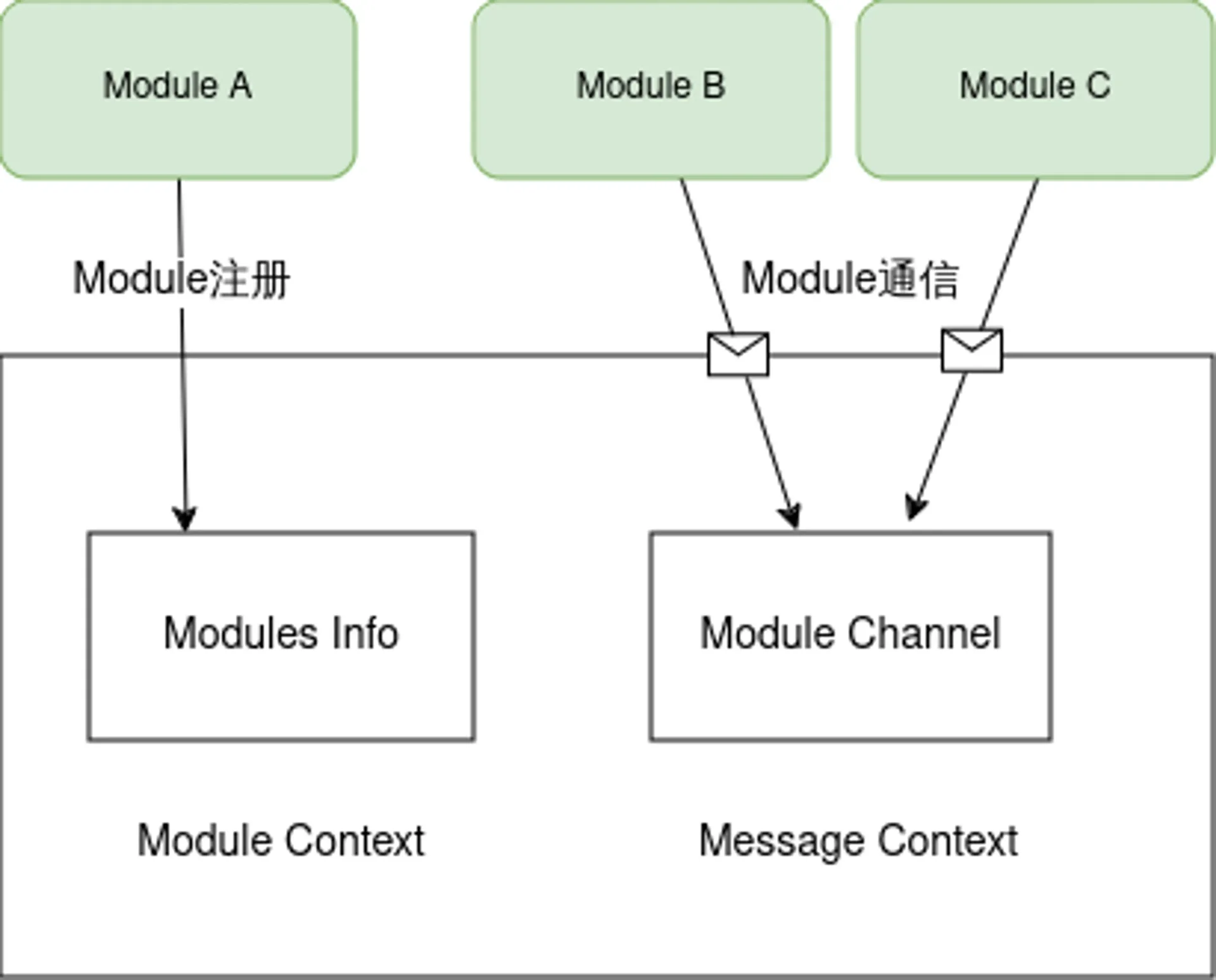
message通訊格式
在分析beehive的具體功能之前,我們先看一下通訊的訊息格式,message是beehive中不同module之間通訊的資訊載體,message包含三部分內容,如下所示:
- Header:
- ID:訊息ID,UUID字串
- ParentID:如果是對同步訊息的響應,則說明parentID存在 (只會在同步訊息的響應中存在)
- TimeStamp:生成訊息的時間 (時間戳
- Sync:訊息是否為同步型別訊息的標誌,為
true則說明是同步訊息
- Route:
- Source:訊息的來源
- Group:訊息所屬的group
- Operation:資源的操作
- Resource:操作的資源
- Content:訊息的內容
context資料結構
ModuleContext和MessageContext定義的介面均由Context來實現,其資料結構如下所示:
//Context is object for Context channel
type Context struct{
	//ConfigFactory goarchaius.ConfigurationFactory
	channels map[string]chan model.Message
	chsLock  sync.RwMutex
	typeChannels map[string]map[string]chan model.Message
	typeChsLock  sync.RWMutex
	anonChannels map[string]chan model.Message
	anonChsLock  sync.RWMutex
}- channels - channels是模組的名稱和對應的訊息channel對映,用於將訊息傳送到相應的模組
- chsLock - channels map的鎖
- typeChannels - typeChannels是一個兩級map,第一級key是group名字,第二級key是module名字,value是module對應的訊息channel。
- typeChsLock - typeChannels map的鎖
- annoChannels - annoChannels是訊息parentID到channel的對映,將用於傳送同步訊息的響應。
- annoChsLock - annoChannels map的鎖
beehive module管理
在beehive中,module定義是一個介面,只要實現了此介面,便可以稱為module,在KubeEdge中常見的模組,如cloudhub、edgehub、edgeController等,都已經實現了這個介面。
//Module Interface
type Moudule interface{
	Name() string
	Group() string
	Start()
	Enable() bool
}Beehive支援的module操作如下:
	type ModuleContext interface {
	AddModule(info *common.ModuleInfo)
	AddModuleGroup(module.group string)
	Cleanup(module string)
}| 介面 | 功能 | 實現 |
|---|---|---|
| AddModule | 新增module | 首先建立一個message型別的channel,然後儲存到Context中的channels map裡 |
| AddModuleGroup | 新增module到所屬group | 首先會從Context中的channels map裡查詢對應的channel,然後將對應的group以及module和channel儲存到typeChannels裡面 |
| Cleanup | 清理module | 將module資訊從channels和typeChannels清除 |
beehive訊息通訊管理
beehive中註冊的模組之間,可以相互通訊,beehive支援多種通訊方式,如下所示:
//MessageContext is interface for messaging syncing
type MessageContext interface {
	//async mode
	Send(module string, message model.Message)
	Receive(module string)(model.Message error)
	//sync mode
	SendSync(module string,message model.Message,timeout time.Duration)(model.Message error)
	SendResp(message model.Message)
	//group broadcast
	SendToGroup(group string,message model.Message)
	SendToGroupSync(group string,message model.Message,timeout time.Duration) error
}| 介面 | 功能 | 實現 |
|---|---|---|
| Send | 傳送非同步訊息到指定module | 從Context中的channels map裡查詢對應module的channel,然後將訊息放入到channel裡面 |
| Receive | 接收傳送到指定module的訊息 | 從Context中的Channels map查詢對應module的channel,然後從channel裡面取出訊息,如果沒有訊息到達,則會阻塞,直至有訊息到達 |
| SendSync | 傳送同步訊息到指定module | SendSync從channels map中獲取模組的channel,將訊息放入channel,然後建立一個新的channel,並將其新增到annoChannels對映中,其中key是messageID,然後在這個channel上等待接收訊息(響應),直到超時,如果在超時之前收到響應訊息,則返回響應訊息,否則返回空的訊息和超時錯誤 |
| SendResp | 傳送對同步訊息的響應 | 根據message中parentID在annoChannels查詢對應的channel,然後將訊息放入channel中,如果不存在,則記錄錯誤 |
| SendToGroup | 傳送非同步訊息到指定group下的所有module | SendToGroup從typeChannels map中獲取指定group下的所有module,然後遍歷module,依次傳送訊息到module |
| SendToGroupSync | 傳送同步訊息到指定group下的所有module | SendToGroup從typeChannels map中獲取指定group下的所有module,建立了一個size和module數量一樣的匿名通道,然後遍歷module,呼叫send傳送訊息,然後等待匿名訊息通道收到訊息的數量等於size |
beehive模組註冊啟動
在cloudcore或者edgecore啟動的時候,會將所有的module註冊到beehive核心,beehive中維護了module名字到module的對映。
//registerModules register all the modules started in cloudcore
func registerModules(c *v1alpha1.CloudCoreConfig){
	cloudhub.Register(c.Modules.Cloudhub)
	edgecontroller.Register(c.Modules.EdgeController)
	devicecontroller.Register(c.Modules.DeviceController)
	nodeupgradejobcontroller.Register(c.Modules.NodeUpgradeJobController)
	synccontroller.Register(c.Modules.SyncController)
	cloudstream.Register(c.Modules.CloudStream,c.CommonConfig)
	router.Register(c.Modules.Router)
	dynamiccontroller.Register(c.Modules.DynamicController)
	policycontroller.Register(client.CrdConfig)
}
https://github.com/kubeedge/kubeedge/blob/master/cloud/cmd/cloudcore/app/server.go#L155-L166
在beehive啟動的時候,會獲取所有註冊的module,然後遍歷所有的module,依次執行如下操作:
- 根據module的型別,初始化moduleInfo資訊
- 執行beehiveContext.AddModule
- 執行beehiveContext.AddModuleGroup
- 呼叫每個module的start方法啟動module
//StartModules starts modules that are registered
func StartModules(){
	//only register channel mode,if want to use socket mode,we should also pass in common.MsgCtxTypeUSparameter
	beehiveContext.InitContext([]string{common.MsgCtxTypeChannel})

	modules := GetModules()

	for name, module := range modules{
		var m common.ModuleInfo
		switch module.contextType{
		case common.MsgCtxTypeChannel:
			m = common.ModuleInfo{
				ModuleName: name,
				ModuleType: module.contextType,
			}
		......

		default:
			klog.Exitf("unsupported context type: %s",module.contextType)
		}

		beehiveContext.AddModule(&m)
		beehiveContext.AddModuleGroup(name,module.module.Group())

		go moduleKeeper(name, module, m)
		klog.Infof("starting module %s",name)
	}
}viaduct
viaduct是KubeEdge雲邊通訊的中介軟體,基於統一的抽象介面,提供了不同協議的服務端和客戶端實現,用於邊緣節點和雲端管理面的連線管理和資料傳輸管理。viaduct遮蔽了不同網路協議之間的差異,使用統一的介面對上層提供服務,支援使用者可以透過配置雲邊通訊的網路協議靈活選擇接入協議。目前內建了多種網路協議的實現。如websocket和quic。後續根據不同的邊緣接入場景和業務場景,透過viaduct可以快速對接新的網路協議,滿足使用者的需求。
viaduct中主要分為兩部分:服務端和客戶端介面以及不同協議的實現。服務端被雲端元件CloudCore所使用,用來啟動不同協議的server,用來邊緣節點的接入和資料傳輸,客戶端被邊緣元件edgeCore所使用,是用來發起接入的client,用於連線雲端CloudCore元件。其主要架構如下圖所示:
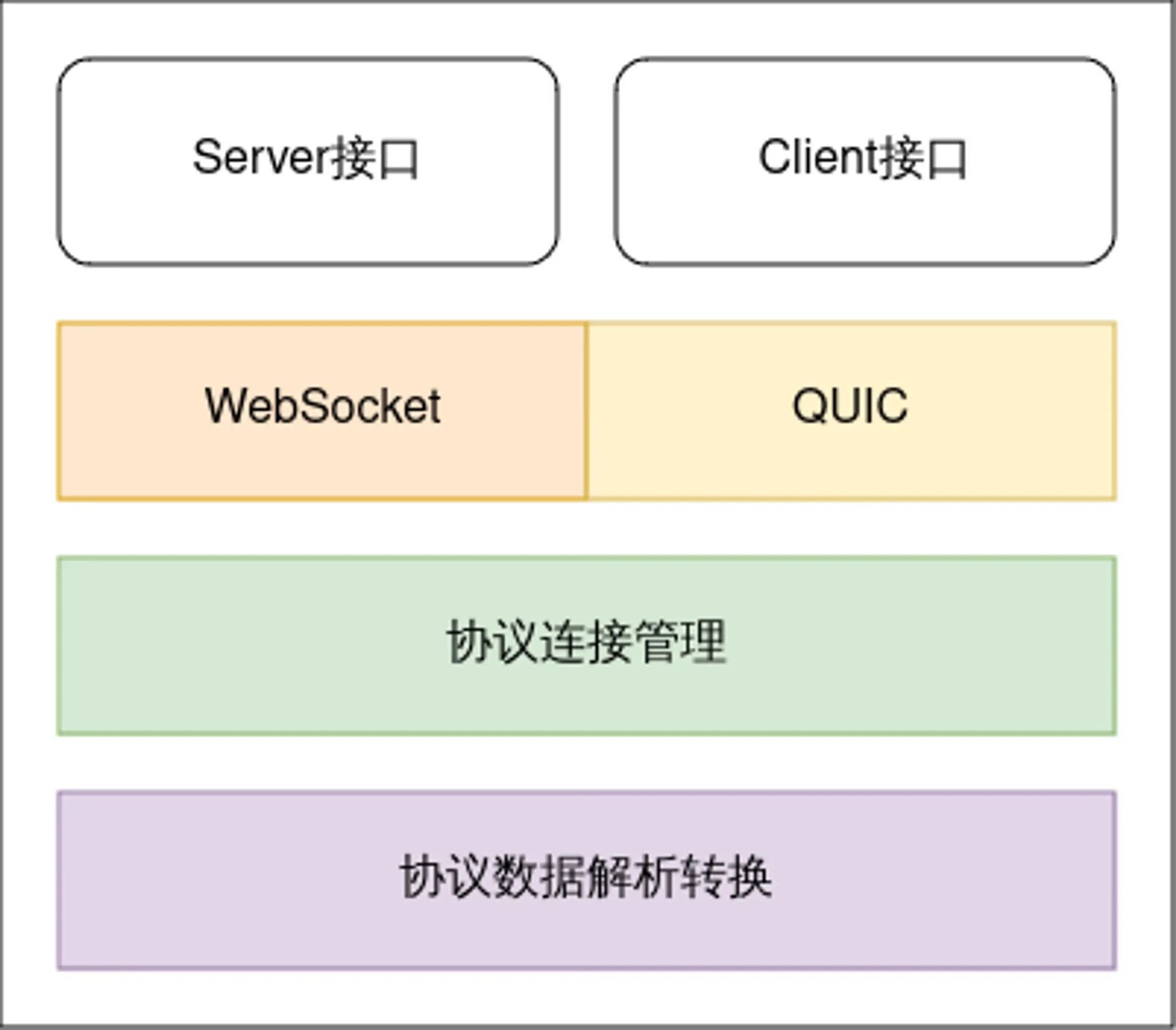
接下來以WebSocket協議為例子,來介紹服務端和客戶端介面以及實現。
Connection介面定義
Connection是viaduct中核心的介面,viaduct支援雙向通訊協議,雲端和邊緣節點可以雙向訊息傳輸,在邊緣節點接入的時候,server端和client端均需要初始化Connection,並透過此Connection進行全雙工通訊。Connection介面定義如下:
//the operation set of connection
type Connection interface{
	//process message from the connection
	ServeConn() //服务端从通道中持续的读取消息

	//SetReadDeadline sets the deadline for future Read calls
	//and any currently-blocked Read call.
	//A zero value for t means Read will not time out.
	SetReadDeadline(t time.Time) error

	//SetWriteDeadline sets the deadline for future write calls
	//and any currently-blocked write call.
	//Even if write times out.It may return n > 0, indicating that
	//some of the data was successfully written.
	//A zero value for t means write will not time out.
	SetWriteDeadline(t time.Time) error

	//write write raw data to the connection
	//it will open a stream for raw data
	write(raw []byte)(int,error)

	//writeMessageAsync writes data to the connection and don't care about the response
	WriteMessageAsync(msg *model.Message) error //异步

	//writeMessageSync writes data to the connection and care about the response
	WriteMessageSync(msg *model.Message)(*model.Message,error) //同步

	//ReadMessage reads message from the connection
	//it will be blocked when no message received
	//if you want to use this api for message reading
	//make sure AutoRoute be false
	ReadMessage(msg *model.Message ) error

	//RemoteAddr returns the remote network address
	RemoteAddr() net.Addr

	//LocalAddr returns the local network address
	LocalAddr() net.Addr

	//connectState return the current connection state
	ConnectionState() connectionState

	//Close closes the connection
	//Any blocked Read or Write operations will be unblocked and return errors
	Close() error
}其核心介面如下:
| 介面 | 功能 |
|---|---|
| ServeConn | 雲端server使用,持續的從connection中讀取資料並轉換成message,然後呼叫回撥函式執行分發操作 |
| Read | 從connection中讀取原始byte資料 |
| Write | 向connection中寫入原始byte資料 |
| WriteMessageAsync | 向connection中寫入message資料,不需要對端響應 |
| WriteMessageSync | 向connection中寫入message資料,同時等待對端的響應訊息 |
| ReadMessage | 從connection中讀取資料並轉化為message格式 |
server介面定義及websocket實現
server的介面定義比較簡單
//protocol server
type ProtocolServer interface {
	ListenAndServerTLS() error
	close() error
}
websocket協議的實現也比較簡單
func (srv *WSServer) ListenAndServeTLS() error{
		return srv.server.ListenAndServeTLS("","")
}
func (srv *WSServer)Close() error{
	if srv.server != nil{
		return srv.server.Close()
	}
	return nil
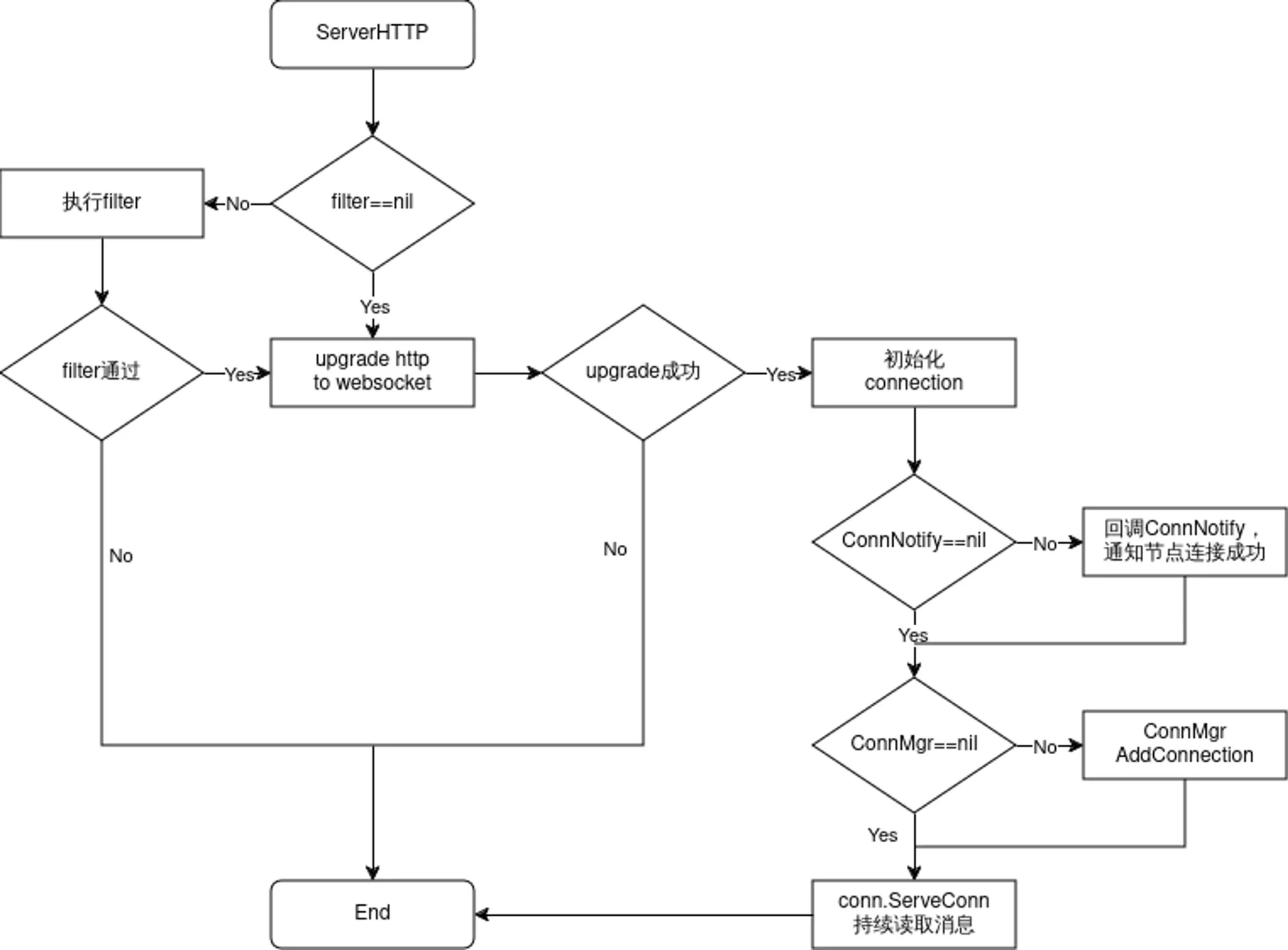
}WSServer的核心邏輯在於ServeHTTP方法裡面,用於處理邊緣節點的接入,流程如下所示:
client介面定義及websocket實現
client介面定義也是比較簡單,如下所示,Connect方法用於連線雲端的server,並返回Connection物件,然後邊緣側使用此connection進行訊息的讀取和寫入
//each protocol(websocket/quic) provides Connect
type Protocolclient interface{
	Connect() (conn.Connection,error)
}
websocket Client透過dial發起對雲端的連線,連線成功之後,如果對應的Callback不為空,則發起回撥函式,然後初始化connection物件並返回
//Connect try to connect remote server
func(c *WSClient)Connect()(conn.Connection,error){
	header := c.exOpts.Header
	header.Add("ConnectionUse",string(c.options.ConnUse))
	wsConn,resp,err := c.dialer.Dial(c.options.Addr,header)
	if err ==nil{
		klog.Infof("dial %s successfully",c.options.Addr)

		//do user's processing on connection or response
		if c.exOpts.callback != nil{
			c.exOpts.Callback(wsConn,resp)
		}
		return conn.NewConnection(&conn.ConnectionOptions{
			ConnType: api.ProtocolTypeWS,
			ConnUse:  c.options.ConnUse,
			Base:     wsConn,
			Consumer: c.options.Consumer,
			Handler:  c.options.Handler,
			CtrlLane: lane.NewLane(api.ProtocolTypeWS,wsConn),
			State:    &conn.ConnectionState{
				State:  api.StatConnected,
				Headers:c.exOpts.Header.Clone(),
			},
			AutoRoute: c.options.AutoRoute,
		}),nil
	}

	//something wrong!
	var respMsg string
	if resp != nil{
		body, errRead := io.ReadAll(io.LimitReader(resp.Body,comm.MaxReadLength))
		if errRead ==nil{
			respMsg = fmt.Sprintf("response code: %d,response body: %s",resp.StatusCode,string(body))
		}else{
			respMsg = fmt.Sprintf("response code: %d",resp.StatusCode)
		}
		resp.Body.Close()
	}
	klog.Errorf("dial websocket error(%+v), response message: %s",err, respMsg)

	return nil,err
}cloudhub
Cloudhub是雲端元件Cloudcore的一個模組,負責邊緣節點的接入和雲邊資料傳輸,是Controllers和邊緣Edgecore之間的中介,它負責分發下行訊息(其內封裝了k8s資源事件,如pod update等)到邊緣節點,也負責接收邊緣節點傳送的狀態訊息並轉發至對應的controllers。Cloudhub在KubeEdge中的位置如下所示:
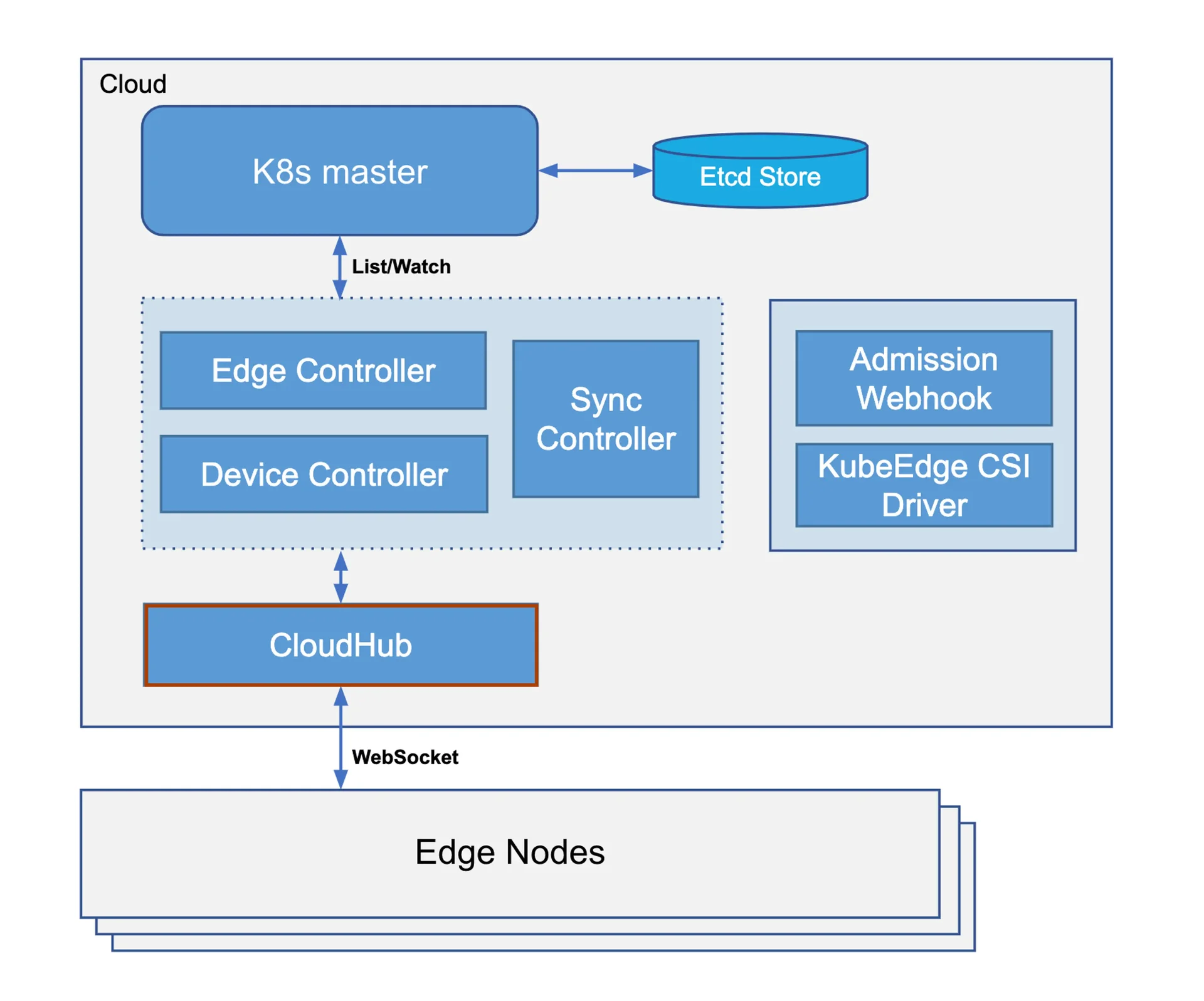
Cloudhub內部有幾個重要的程式碼模組,如下所示:
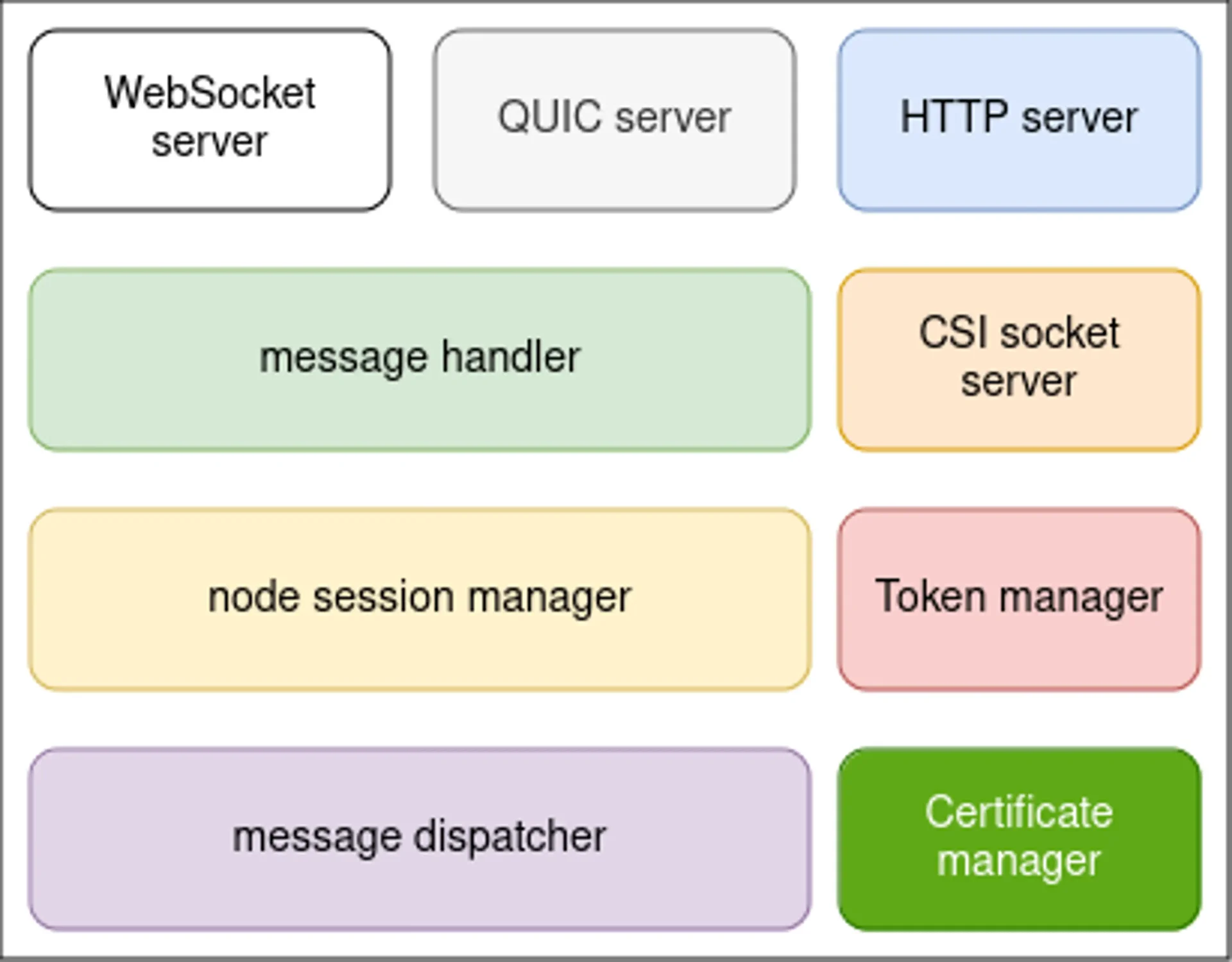
- HTTP server:為邊緣節點提供證書服務入口,如獲取CA證書、證書籤發與證書輪轉
- WebSocket server:可配置是否開啟,為邊緣節點提供WebSocket協議接入服務
- QUIC server:可配置是否開啟,為邊緣節點提供QUIC協議接入服務
- CSI socket server:在雲端用來和csi driver通訊
- Token manager:邊緣節點接入token憑據管理,token預設12h輪轉
- Certificate manager:邊緣節點證書籤發和輪轉的實現模組
- message handler:邊緣節點接入管理和邊緣訊息處理分發
- node session manager:邊緣節點會話生命週期管理
- message dispatcher:上行和下行訊息分發管理
Cloudhub啟動流程
Cloudhub在Cloudcore啟動時註冊,透過beehive訊息通訊框架呼叫Start()函式啟動Cloudhub模組
cloudhub.Register(c.modules.Cloudhub)Cloudhub啟動的時候,首先會啟動dispatcher.DispatchDownstream協程,用來非同步分發下行訊息,其次進行證書的初始化,如果沒有配置證書,則會自動生成CA和服務證書,用於後續WebSocket、Quic、HTTP服務的安全通訊。然後啟動token manager模組,生成邊緣節點接入使用的token憑據以及開啟自動輪轉服務。StartHTTPServer()啟動伺服器監聽,主要用於EdgeCore申請證書,它將等待edgecore發來請求,獲取證書。然後,啟動cloudhub服務,具體的操作是使用viaduct中介軟體啟動一個伺服器,等待edgecore發來連線的請求,協議可以是基於tcp的WebSocket或基於udp的QUIC。如果使用者需要使用CSI相關功能,則會啟動CSI socket server。
func (ch *cloudHub) Start(){
	if !cache.WaitForCacheSync(beehiveContext.Done(),ch.informersSyncedFuncs...
	{
		klog.Errorf("unable to sync caches for objectSyncController")
		os.Exit(1)
	}

	//start dispatch message from the cloud to edge node
	go ch.dispatcher.DispatchDownstream()

	//check whether the certificates exists in the local directory.
	//and then check whether certificates exists in the secret.
	//generate if they don't exist
	if err := httpserver.PrepareAllCerts(): err!=nil{
		klog.Exit(err)
	}

	DoneTLSTunnelCerts <- true
	close(DoneTLSTunnelCerts)

	//generate Token
	if err:=httpserver.GenerateToken():err!=nil{
		klog.Exit(err)
	}

	//HttpServer mainly used to issue certificates for the edge
	go httpserver.StartHTTPServer()

	servers.StartCloudHub(ch.messageHandler)

	if hubconfig.Config.UnixSocket.Enable{
	//The uds server is only used to communicate with csi driver from kubeedge on cloud
	//It is not used to communicate  between cloud and edge
	go udsserver.StartServer(hubconfig.Config.unixSocket.Address)
	}
}
https://github.com/kubeedge/kubeedge/blob/master/cloud/pkg/cloudhub/cloudhub.go
接下來,我們看一下cloudhub的核心功能,邊緣節點接入管理和訊息分發管理,下圖是CloudHub的內部實現架構圖:
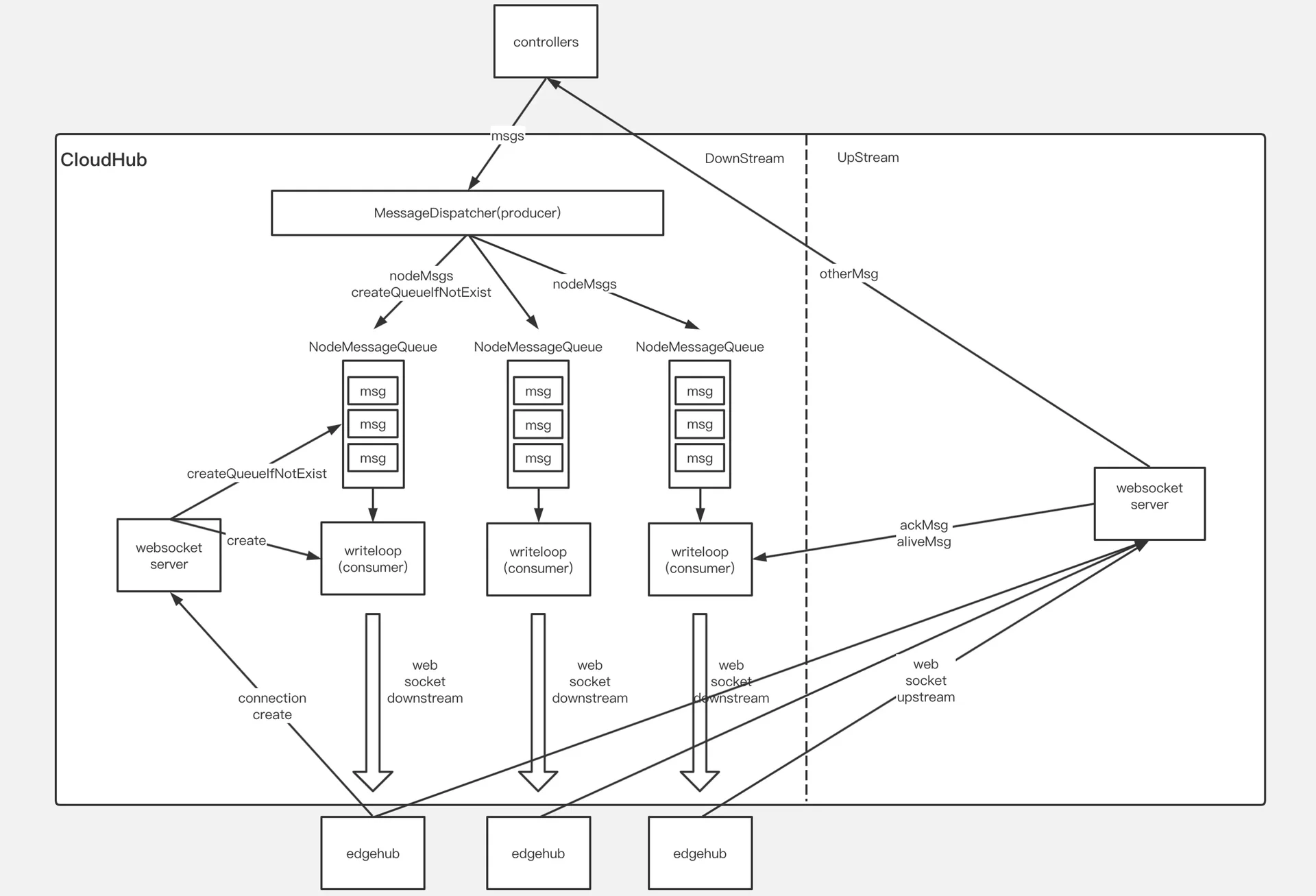
下行訊息傳送模式
傳送到邊緣節點的下行訊息,有兩種傳送模式,這兩種傳送模式,直接關係到下行訊息的分發和節點session的訊息處理,如下所示:
ACK模式:在這種模式下,邊緣節點收到下行訊息並將訊息正確儲存到本地資料儲存之後,需要給雲端傳送ACK響應訊息以通知雲端訊息在邊緣側被正確處理,如果雲端沒有收到ACK訊息,則認為訊息沒有在邊緣節點正確處理,則會重試,直到收到ACK響應訊息
NO-ACK模式:在這種模式下,邊緣節點收到下行訊息後,不需要給雲端傳送ACK響應訊息,雲端認為邊緣側已經收到訊息並正確處理,在這種模式下,訊息有可能丟失。這種模式,通常用於給邊緣節點同步訊息傳送響應,如果邊緣側沒有收到響應,則會觸發重試操作。
邊緣節點接入
邊緣節點接入的主要邏輯在messageHandler裡面,handler介面如下所示:
type Handler interface{
	//HandleConnection is invoked when a new connection arrives
	HandleConnection(connection conn.Connection)

	//HandleMessage is invoked when a new message arrives
	HandleMessage(container *mux.MessageContainer,writer mux.ResponseWriter)

	//OnEdgeNodeConnect is invoked when a new connection is established
	OnEdgeNodeConnect(info *model.HubInfo,connection conn.Connection) error
	//OnEdgeNodeDisconnect is invoked when a connection is lost
	OnEdgeNodeDisconnect(info *model.HubInfo,connection conn.Connection)

	//OnReadTransportErr is invoked when the connection read message err

}
https://github.com/kubeedge/kubeedge/blob/master/cloud/pkg/cloudhub/handler/message_handler.go
HandleConnection用來處理邊緣節點接入,以WebSocket協議接入為例,WebSocket server透過viaduct啟動之後,當有邊緣節點接上來時,viaduct中serverHTTP將http協議upgrade成為websocket協議,然後初始化Connection物件,HandleConnection根據傳入的connection物件進行一系列初始化操作:
- 執行初始化前的校驗工作,如是否超過配置的node數量限制。
nodeID := connection.ConnectionState().Headers.Get("node_id")
projectID := connection.ConnectionState().Headers.Get("project_id")

if mh.SessionManager.ReachLimit(){
	klog.Errorf("Fail to serve node %s,reach node limit",nodeID)
	return
}- 初始化nodeMessagePool,並加入到MessageDispatcher的雜湊表中,用於儲存分發的下行訊息。
//init node message pool and add to the dispatcher
nodeMessagePool := common.InitNodeMessagePool(nodeID)
mh.MessageDispatcher.AddNodeMessagePool(nodeID,nodeMessagePool)
nodeMessagePool是用來儲存下行訊息的佇列,每個邊緣節點在接入時,都會初始化一個對應的nodeMessagePool,和之前的下行訊息傳送模式對應,nodeMessagePool包含兩個佇列,分別用來儲存ACK和NO-ACK模式的下行訊息。
//NodeMessagePool is a collection of all downstream message sent to an
//edge node.There are two types of messages,one that requires an ack
//and another that does not.For each type of message.we use the 'queue'
//to mark the order of sending, and use the 'store' to store specific messages
type NodeMessagePool struct{
	//AckMessageStore store message that will send to edge node
	//and require acknowledgement from edge node
	AckMessageStore cache.Store
	//AckMessageQueue store message key that will send to edge node
	//and require acknowledgement from edge node
	AckMessageQueue workqueue.RateLimitingInterface
	//NoAckMessageStore store message that will send to edge node
	//and do not require acknowledgement from edge node
	NoAckMessageStore cache.Store
	//NoAckMessageQueue store message key that will send to edge node
	//and do not require acknowledgement from edge node
	NoAckMessageQueue workqueue.RateLimitingInterface
}
https://github.com/kubeedge/kubeedge/blob/master/cloud/pkg/cloudhub/common/message_pool.go
- 初始化nodeSession物件,加入到SessionManager雜湊表中,並啟動nodeSession
//create a node session for each edge node
nodeSession := session.NewNodeSession(nodeID,projectID,connection,
	keepaliveInterval,nodeMessagePool,mh.reliableClient)
//add node session  to the session manager
mh.SessionManager.AddSession(nodeSession)

//Start session for each edge node and it will keep running until
//it encounters some Transport Error from underlying connection.
nodeSession.Start()
每個邊緣節點對應一個nodeSession,nodeSession是對每個邊緣節點連線會話的抽象,SessionManager儲存並管理連線到當前cloudHub的所有邊緣節點的session,nodeSession啟動時,會啟動該節點所需要的所有處理協程,包括:KeepAliveCheck心跳檢測,SendAckMessage傳送ACK模式的下行訊息,SendNoAckMessage傳送NO-ACK模式的下行訊息。
//Start the main goroutine responsible for serving node session
func (ns *NodeSession)Start(){
	klog.Infof("Start session for edge node %s",ns.nodeID)

	go ns.KeepAliveCheck()
	go ns.SendAckMessage()
	go ns.SendNoAckMessage()

	<-ns.ctx.Done()
}
上下行訊息分發
在CloudHub中,上下行訊息的處理比較簡單,主要邏輯在messageHandler的HandleMessage方法中,底層的viaduct庫進行資料的解析轉換成MessageContainer物件,裡面包含了message資訊,HandleMessage收到message後,進行簡單的校驗,然後呼叫MessageDispatcher DispatchUpstream方法,轉發到不同的模組,如edgeController、deviceController等。
//HandleMessage handle all the request from node
func (mh *messageHandler)HandleMessage(coantainer *mux.MessageContainer,writer mux.ResponseWriter){
	nodeID := container.Header.Get("node_id")
	projectID := container.Header.Get("project_id")

	//validate message
	if container.Message == nil{
		klog.Errorf("The message is nil for node: %s",nodeID)
		return
	}

	klog.v(4).Infof("[messageHandler]get msg from node(%s): %+v",nodeID,container.Message)

	//dispatch upstream message
	mh.MessageDispatcher.DispatchUpstream(container.Message,&model.HubInfo{ProjectID: projectID,NodeID:nodeID})
}
下行訊息的分發流程,以傳送ACK訊息為例,主要包括以下流程:
- KubeEdge使用K8s objectSync CRD儲存已成功傳送到Edge的資源的最新的resourceVersion。當Cloudhub重新啟動或正常啟動時,它將檢查待傳送的資源resourceVersion和已傳送成功的resourceVersion,以避免傳送舊訊息。
- EdgeController和devicecontroller等將訊息傳送到Cloudhub,MessageDispatcher將根據訊息中的節點名稱,將訊息傳送到對應的NodeMessagePool,同時會根據訊息的resource等資訊來選擇傳送模式。在加入佇列的過程中,會查詢資源對應的objectSync CR,獲取傳送成功的最新資源resourceVersion,並和待加入佇列的訊息比較,避免重複傳送。
- 節點對應的nodeSession SendAckMessage協程將順序地將資料從NodeMessagePool取出傳送到相應的邊緣節點,同時並將訊息ID儲存在ACK channel中。當收到來自邊緣節點的ACK訊息時,ACK channel將收到通知,並將當前訊息的resourceVersion儲存到objectSync CR中,併傳送下一條訊息。
- 當Edgecore收到訊息時,它將首先將訊息儲存到本地資料儲存中,然後將ACK訊息返回給雲端。如果cloudhub在此間隔內未收到ACK訊息,它將繼續重新傳送該訊息5次。如果所有5次重試均失敗,cloudhub將丟棄該事件。
- CloudCore中另一個模組SyncController將處理這些失敗的事件。即使邊緣節點收到該訊息,返回的ACK訊息也可能在傳輸過程中丟失。在這種情況下,SyncController將再次傳送訊息給cloudhub,再次觸發下行訊息分發,直至成功。
func (ns *NodeSession)SendMessageWithRetry(copyMsg, msg *beehivemodel.Message)error{
	ackChan := make(chan struct{})
	ns.ackMessageCache.Store(copyMsg.GetID(),ackChan)

	//initialize retry count and timer for sending message
	retryCount := 0
	ticker := time.NewTimer(sendRetryInterval)

	err := ns.connection.WriteMessageAsync(copyMsg)
	if err !=nil{
		return err
	}

	for{
		select{
		case <- ackChan:
			ns.saveSuccessPoint(msg)
			return nil

		case <- ticker.C:
			if retryCount == 4{
				return ErrwaitTimeout
			}
			err := ns.connection.WriteMessageAsync(copyMsg)
			if err !=nil{
				return err
			}
			retryCount++
			ticker.Reset(sendRetryInterval)
		}
	}
}
https://github.com/kubeedge/kubeedge/tree/master/cloud/pkg/cloudhub/session
synccontroller
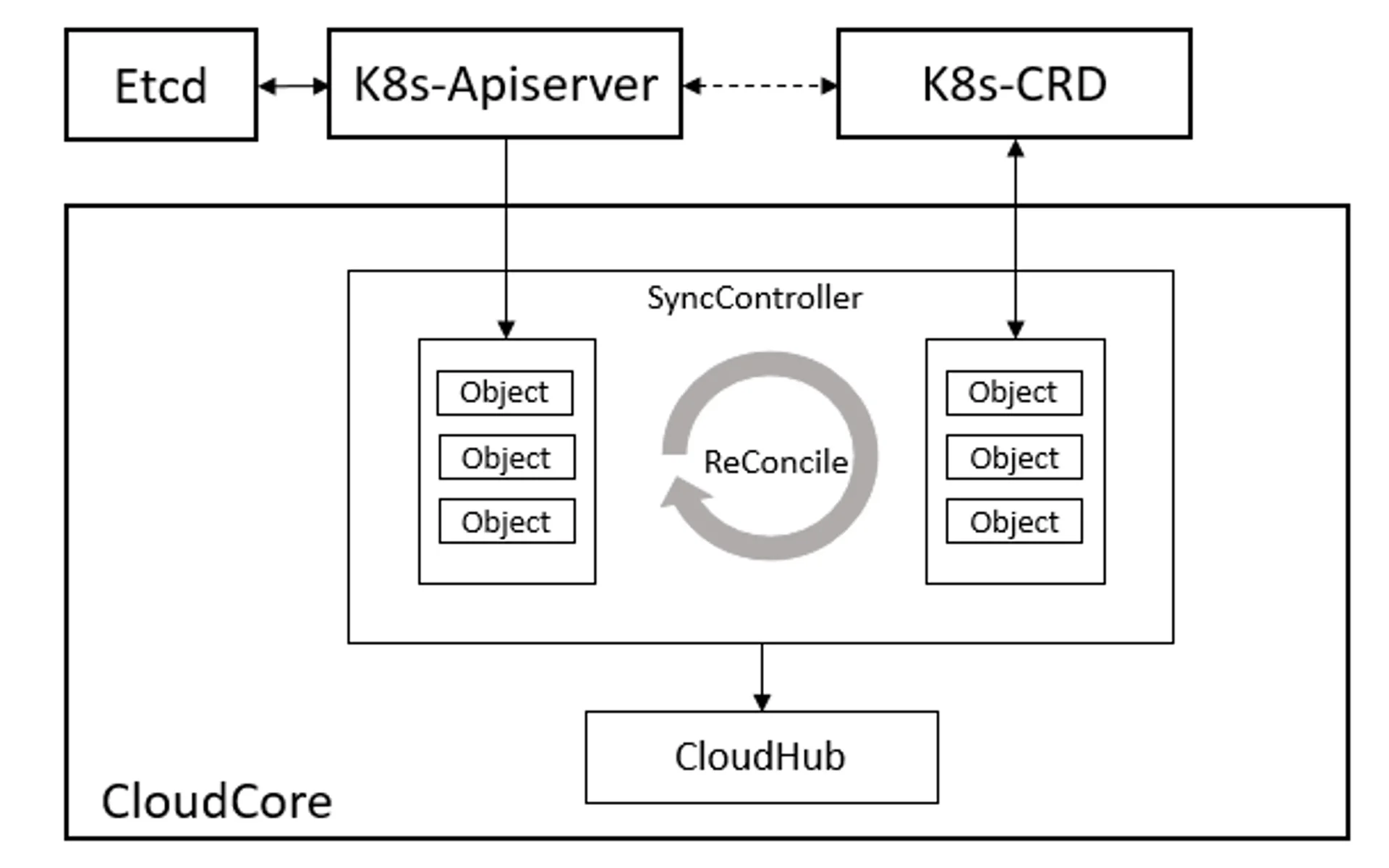
在邊緣計算場景下,邊緣的網路通常是不穩定的,這將導致雲邊的網路連線頻繁斷開,在雲邊協同通訊時存在丟失資料的風險。synccontroller是CloudCore中的一個模組,用來保障訊息的可靠性傳送。在KubeEdge中,使用objectSync物件來持久化雲邊協同訊息狀態。在雲和邊緣狀態同步的過程中,雲端會實時記錄每個邊緣節點同步成功的最新訊息版本號(ResourceVersion),並以CR的形式持久化儲存到K8s中。該機制可以保證在邊緣場景下雲端故障或者邊緣離線重啟後訊息傳送的順序和連續性,避免重發舊訊息引起雲邊狀態不一致問題。與此同時,synccontroller會週期性檢查同步雲邊資料,保持一致性。它主要負責週期性檢查每個邊緣節點的同步狀態,對比K8s中資源的資訊,將不一致的狀態同步到邊緣,確保雲邊狀態的最終一致性。
synccontroller在Cloudcore啟動時註冊,透過beehive訊息通訊框架呼叫Start()函式啟動synccontroller模組。
synccontroller.Register(c.Modules.syncController)synccontroller啟動時,會開啟週期性的檢測,間隔5s執行一次。
func (sctl *SyncController) Start(){
	if !cache.WaitForCacheSync(beehiveContext.Done(),sctl.informersSyncedFuncs...){
		klog.Errorf("unable to sync caches for sync controller")
		return
	}

	sctl.deleteObjectSyncs() //check outdate sync before start to reconcile
	go wait.Until(sctl.reconcile, 5*time.Second,beehiveContext.Done())
}
https://github.com/kubeedge/kubeedge/tree/master/cloud/pkg/synccontroller
ObjectSync用於儲存名稱空間範圍的物件。它們的名稱由相關的節點名稱和物件UUID組成,SyncController將定期比較儲存的ObjectSync物件中的已傳送resourceVersion與K8s中的物件,然後觸發諸如重試或刪除之類的事件。當cloudhub將事件新增到NodeMessagePool時,它將與NodeMessagePool中的相應物件進行比較。如果NodeMessagePool中的物件較新,它將直接丟棄這些事件,否則CloudHub將訊息傳送到邊緣側。
edgehub
EdgeHub是一個Web Socket或者Quic協議的客戶端,負責與雲端CloudCore互動,包括同步雲端資源更新、報告邊緣主機和裝置狀態變化到雲端等功能。
EdgeHub在EdgeCore啟動時透過beehive框架註冊,並對edgehub進行了初始化。
func Register(eh *v1alpha2.EdgeHub,nodeName string){
	config.InitConfigure(eh,nodeName)
	core.Register(newEdgeHub(eh.Enable))
}
EdgeHub啟動程式碼如下所示:
func (eh *EdgeHub)Start(){
	eh.certManager = certificate.NewCertManager(config.config.EdgeHub,config.config.NodeName)
	eh.certManager.Start()
	for _, v := range GetCertSyncChannel(){
		v <- true
		close(v)
	}

	go eh.ifRotationDone()

	for{
		select{
			case <- beehiveContext.Done():
			klog.warning("EdgeHub stop")
			return
		default:
		}
		err := eh.initial()
		if err != nil{
			klog.Exitf("failed to init controller:%v",err)
			return
		}
		waitTime := time.Duration(config.Config.Heartbeat)*time.Second*2

		err = eh.chClient.Init()
		if err!= nil{
			klog.Errorf("connection failed: %v,will reconnect after %s",err,waitTime.String())
			time.Sleep(waitTime)
			continue
		}
		//execute hook func after connect
		eh.pubConnectInfo(true)
		go eh.routeToEdge()
		go eh.routeToCloud()
		go eh.keepalive()

		//wait the stop signal
		//stop authinfo manager/websocket connection
		<-eh.reconnectChan
		eh.chClient.UnInit()

		//execute hook function after disconnect
		eh.pubConnectInfo(false)

		//sleep one period of heartbeat, then try to connect cloud hub again
		klog.warningf("connection is broken, will reconnect after %s",waitTime.String())
		time.Sleep(waitTime)

	//clean channel
	clean:
		for{
			select{
			case <- eh.reconnectChan:
			default:
				break clean
			}
		}
	}
}
https://github.com/kubeedge/kubeedge/blob/master/edge/pkg/edgehub/edgehub.go
EdgeHub的啟動過程如下所示,主要包含以下步驟:
- 證書初始化,從cloudcore申請證書(若正確配置本地證書,則直接使用本地證書),啟動證書輪轉模式,然後進入迴圈
- 呼叫eh.initial()建立eh.chClient,接著呼叫eh.chClient.Init(),初始化過程透過viaduct庫建立了websocket/quic的connection
- 呼叫eh.pubConnectInfo(true),向edgecore各模組廣播已經連線成功的訊息
- 接下來啟動了三個協程:
- routeToEdge
- routeToCloud
- keepalive
routeToEdge:接收雲端傳送下來的訊息,如果是同步訊息響應,則呼叫beehive sendResp傳送響應,否則,根據訊息的group,傳送到對應的group
func (eh *EdgeHub)routeToEdge(){
	for{
		select{
		case<-beehiveContext.Done():
			klog.Warning("EdgeHub RouteToEdge stop")
			return
		default:
		}
		message, err := eh.chClient.Receive()
		if err!=nil{
			klog.Errorf("failed to dispatch message,discard: %v",err)
		}
	}
}
routeToCloud:接收邊緣側其他module傳送過來的訊息,然後將訊息透過websocket/quic client傳送到雲端
func (eh *EdgeHub)routeToCloud(){
	for{
		select{
		case<-beehiveContext.Done():
			klog.warning("EdgeHub RouteToCloud stop")
			return
		default:
		}
		message,err:= beehiveContext.Receive(modules.EdgeHubModuleName)
		if err !=nil{
			klog.Errorf("failed to receive message from edge: %v",err)
			time.Sleep(time.Second)
			continue
		}

		err = eh.tryThrottle(message.GetID())
		if err !=nil{
			klog.Errorf("msgID: %s,client rate limiter returned an error: %v",message.GetID(),err)
			continue
		}

		//post message to cloud hub
		err = eh.sendToCloud(message)
		if err !=nil{
			klog.Errorf("failed to send message to cloud: %v",err)
			eh.reconnectChan <- struct{}{}
			return
		}
	}
}
keepalive:根據心跳週期定期向雲端傳送心跳資訊
func (eh *EdgeHub)keepalive(){
	for{
		select{
		case <-beehiveContext.Done():
			klog.warning("EdgeHub KeepAlive stop")
			return
		default:
		}
		msg := model.NewMessage("").
			BuildRouter(modules.EdgeHubModuleName,"resource","node",messagepkg.OperationKeepalive)
			FillBody("ping")

		//post message to cloud hub
		err := eh.sendToCloud(*msg)
		if err != nil{
			klog.Errorf("websocket write error: %v",err)
			eh.reconnectChan <- struct{}{}
			return
		}
		time.Sleep(time.Duration(config.Config.Heartbeat)*time.Second)
	}
}- 當雲邊訊息傳送過程中出現錯誤時,邊緣部分會重新init相應的websocket/quic client,與雲端重新建立連線。